Model Context Protocol (MCP)
What is MCP?
MCP (Model Context Protocol) is an open standard that allows AI assistants to interact with external tools and data sources. Think of it as a universal adapter between AI assistants (like Claude) and your infrastructure.
With the @xen-orchestra/mcp package, your AI assistant can directly query your Xen Orchestra instance to answer questions about your virtualization infrastructure in natural language.
Why MCP with Xen Orchestra?
MCP enables new ways to interact with your infrastructure:
- Natural language queries — Ask "How many VMs are running?" instead of navigating dashboards
- AI-assisted monitoring — Get instant summaries of your infrastructure state
- Quick diagnostics — Ask about specific VMs, hosts, or pools without leaving your conversation
- Documentation at your fingertips — Search XO documentation directly from the assistant
All operations are read-only by default, ensuring safe interaction with your production environment. Write operations can be enabled explicitly — see Write operations.
Installation
Prerequisites
- Node.js 20 or later
- A Xen Orchestra instance, version 6.5 or later, with REST API enabled
- An AI assistant that supports MCP (Claude Desktop, Claude Code, etc.)
The MCP server requires Xen Orchestra 6.5 or later. On an older XO it stops at startup with an error such as Unable to verify MCP status (HTTP 404). Upgrade your Xen Orchestra to use it.
Install the MCP server
npm install -g @xen-orchestra/mcp
Or run directly without installing:
npx @xen-orchestra/mcp
Configure authentication
The MCP server connects to Xen Orchestra via the REST API. Two authentication modes are supported: token (recommended) or username/password.
| Variable | Required | Description |
|---|---|---|
XO_URL | Yes | Xen Orchestra server URL (e.g., https://xo.example.com) |
XO_TOKEN | If no username/password | Authentication token |
XO_USERNAME | If no token | XO user with admin privileges |
XO_PASSWORD | If no token | XO password |
XO_MCP_ENABLE_ACTIONS | No | Set to 1 to expose write/destructive operations (see Write operations) |
To generate a token, go to the XO user page (/user) or run xo-cli create-token. If both XO_TOKEN and XO_USERNAME/XO_PASSWORD are set, token authentication takes priority.
Only admin users can currently use the REST API. See REST API authentication for details.
Configure your AI assistant
Claude Desktop
Add the following to your Claude Desktop configuration file (~/.config/claude-desktop/config.json on Linux, ~/Library/Application Support/Claude/claude_desktop_config.json on macOS):
Using a token (recommended):
{
  "mcpServers": {
    "xo": {
      "command": "npx",
      "args": ["@xen-orchestra/mcp"],
      "env": {
        "XO_URL": "https://your-xo-server",
        "XO_TOKEN": "your-token"
      }
    }
  }
}
Using username/password:
{
  "mcpServers": {
    "xo": {
      "command": "npx",
      "args": ["@xen-orchestra/mcp"],
      "env": {
        "XO_URL": "https://your-xo-server",
        "XO_USERNAME": "admin@example.com",
        "XO_PASSWORD": "your-password"
      }
    }
  }
}
Claude Code
# Using a token (recommended)
claude mcp add xo \
  -e XO_URL=https://your-xo-server \
  -e XO_TOKEN=your-token \
  -- npx @xen-orchestra/mcp

# Using username/password
claude mcp add xo \
  -e XO_URL=https://your-xo-server \
  -e XO_USERNAME=admin@example.com \
  -e XO_PASSWORD=your-password \
  -- npx @xen-orchestra/mcp
Other MCP-compatible clients
Run the MCP server with environment variables set:
# Using a token (recommended)
XO_URL=https://your-xo-server \
XO_TOKEN=your-token \
npx @xen-orchestra/mcp

# Using username/password
XO_URL=https://your-xo-server \
XO_USERNAME=admin@example.com \
XO_PASSWORD=your-password \
npx @xen-orchestra/mcp
The server communicates via stdio using the MCP protocol (JSON-RPC), compatible with any MCP client.
Multiple XO instances
To manage several XO servers from the same assistant, add one entry per instance with a different name:
{
  "mcpServers": {
    "xo-production": {
      "command": "npx",
      "args": ["@xen-orchestra/mcp"],
      "env": {
        "XO_URL": "https://xo-production.example.com",
        "XO_TOKEN": "prod-token"
      }
    },
    "xo-staging": {
      "command": "npx",
      "args": ["@xen-orchestra/mcp"],
      "env": {
        "XO_URL": "https://xo-staging.example.com",
        "XO_TOKEN": "staging-token"
      }
    }
  }
}
With Claude Code:
claude mcp add xo-production \
  -e XO_URL=https://xo-production.example.com \
  -e XO_TOKEN=prod-token \
  -- npx @xen-orchestra/mcp

claude mcp add xo-staging \
  -e XO_URL=https://xo-staging.example.com \
  -e XO_TOKEN=staging-token \
  -- npx @xen-orchestra/mcp
Each entry starts its own process with its own credentials. The assistant gets a separate set of tools per instance, so you can ask about a specific environment by name ("list running VMs on xo-production").
Pick descriptive names (xo-production, xo-dr-site, ...) so the assistant knows which instance you're referring to.
Behind a corporate proxy
The MCP server respects HTTP_PROXY, HTTPS_PROXY, and NO_PROXY. This matters in enterprise networks: your AI assistant may need an outbound proxy to reach the public internet, but your XOA is internal and must be reached directly. Without NO_PROXY, internal traffic gets sent through the proxy and rejected.
| Variable | Effect |
|---|---|
HTTP_PROXY | Proxy URL for plain HTTP requests, e.g. http://proxy.corp.example:3128. Credentials are supported: http://user:pass@proxy:3128 (Basic auth only — NTLM/Kerberos proxies need a sidecar like cntlm). |
HTTPS_PROXY | Proxy URL for HTTPS requests. Same format as HTTP_PROXY. The proxy itself is contacted over HTTP; https:// schemes are unusual. |
NO_PROXY | Comma-separated list of hostnames that bypass the proxy. Three forms: exact host (xoa.internal.example.com), suffix wildcard (.example.com or *.example.com — matches subdomains, not the bare domain — list both if needed), or * alone to bypass everything. CIDR ranges are not supported by the underlying library. Lowercase no_proxy works too. |
Example for Claude Desktop, with a corporate proxy and a XOA on the internal network:
{
  "mcpServers": {
    "xo": {
      "command": "npx",
      "args": ["@xen-orchestra/mcp"],
      "env": {
        "XO_URL": "https://xoa.internal.example.com",
        "XO_TOKEN": "your-token",
        "HTTPS_PROXY": "http://proxy.corp.example:3128",
        "NO_PROXY": "xoa.internal.example.com"
      }
    }
  }
}
NO_PROXY on its own does nothing. If you set it without HTTP_PROXY or HTTPS_PROXY, the MCP logs a warning at startup. A malformed proxy URL is reported on stderr but does not crash the server; it falls back to direct connections.
Disabling MCP globally
Sometimes you need to shut MCP off across the board — during an incident, while reviewing an internal policy, or simply to keep AI access turned off until you've decided who should have it. The xo-server config has a flag for that:
[mcp]
enabled = false
Restart xo-server and the change takes effect immediately:
- The
@xen-orchestra/mcpbinary refuses to start. It printsMCP disabled by adminon stderr and exits with code 1. - Any MCP client already running gets a
503with{ "error": "mcp_disabled" }on its next request, so sessions shut down without leaving stale connections on the server.
The default is enabled = true; legacy configs without an [mcp] section behave the same way. Flip the value, reload, done — no other state to clean up.
The kill-switch keys off the X-XO-Client: mcp header the official binary sends. A third-party MCP client, or an older @xen-orchestra/mcp version that predates this header, will bypass the gate. Pin to a recent release if you rely on the kill-switch as a hard control.
How it works
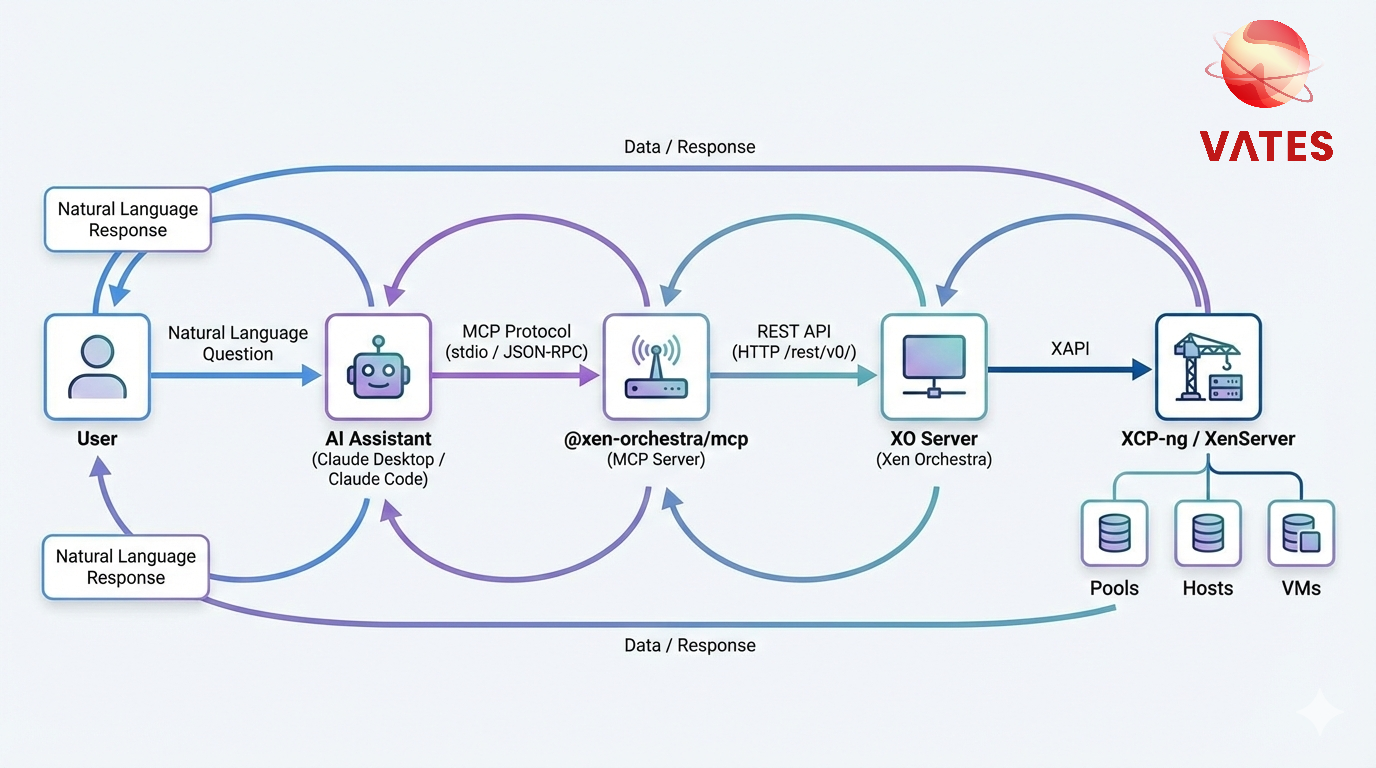
- On startup, the MCP server fetches the OpenAPI spec from your XO instance (
/rest/v0/docs/swagger.json) and generates one tool per resource domain. - You ask a question in natural language to your AI assistant.
- The assistant picks a tool (e.g.
pools_query) and chooses anoperation(e.g.list,dashboard). - The MCP server calls the corresponding XO REST endpoint and returns a markdown-formatted response.
Because the tool surface is generated from the live OpenAPI spec, it always reflects the XO version you're connecting to — new endpoints become available automatically as XO evolves.
Available Tools
Utility tools
These three tools are always present regardless of the XO spec.
check_connection
Test the connection to the Xen Orchestra server. Use this to validate your setup before querying infrastructure.
Parameters: None
Example question: "Can you connect to my XO server?"
get_infrastructure_summary
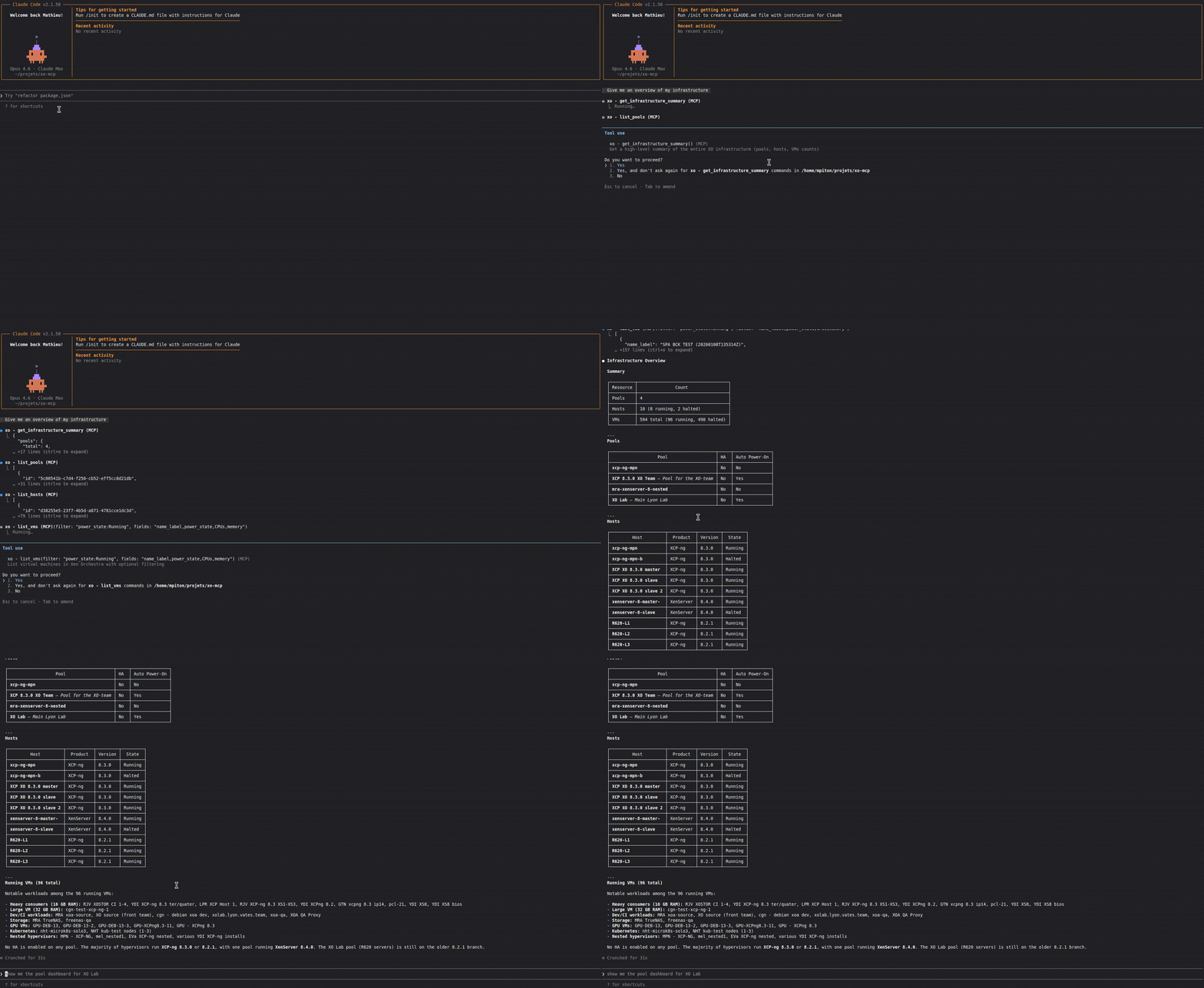
Aggregate pools, hosts, and VMs across the entire infrastructure into a single markdown summary.
Parameters: None
Example question: "Give me an overview of my infrastructure"
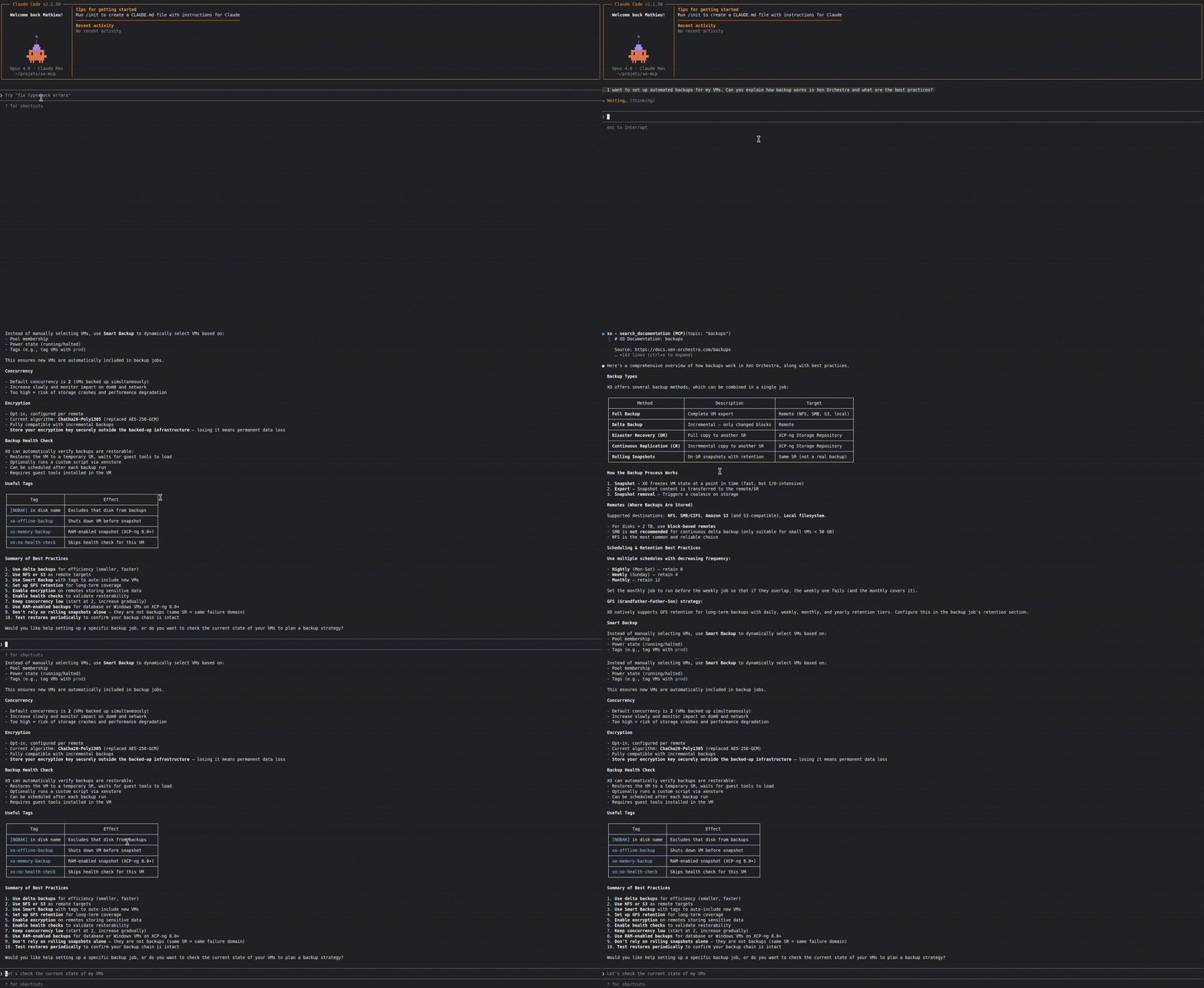
search_documentation
Search and retrieve Xen Orchestra documentation. Useful for learning about XO features, configuration, and best practices.
| Parameter | Type | Required | Description |
|---|---|---|---|
topic | enum | Yes | One of: installation, configuration, backups, restapi, manage, users, architecture, troubleshooting, releases |
Example question: "How do I configure backups in XO?"
Domain query tools
Each resource family exposes a single {domain}_query tool. Domains come from the spec's primary tag (tags[0]) verbatim — no client-side remapping. The MCP layer asks the REST API for a pre-rendered markdown table (?markdown=true) and relays the bytes verbatim; there is no client-side formatting.
All query tools share the same argument shape:
| Parameter | Type | Required | Description |
|---|---|---|---|
operation | enum | Yes | The OpenAPI operationId to invoke. Valid values are listed in the tool description. |
id | string | If required | Resource ID (required for single-resource and sub-resource operations) |
filter | string | No | Filter expression for list operations |
fields | string | No | Comma-separated fields to return (e.g. id,name_label). Passed straight to the REST API; leave empty to get all fields. |
limit | number | No | Maximum number of results for list operations |
Operation names are the operationIds emitted by the server (tsoa, PascalCase). Examples:
| operationId | Endpoint |
|---|---|
GetPools | GET /pools |
GetPool | GET /pools/{id} |
GetPoolDashboard | GET /pools/{id}/dashboard |
EmergencyShutdownPool | POST /pools/{id}/actions/emergency_shutdown |
StartVm | POST /vms/{id}/actions/start |
DeleteVm | DELETE /vms/{id} |
GetVmAlarms | GET /vms/{id}/alarms |
Generated domains (on a current xo-server):
- Compute:
pools_query,hosts_query,vms_query(covers VMs, templates, snapshots, controllers — tsoa groups them undervmsserver-side) - Storage:
vdis_query(includes VDI snapshots),srs_query,vbds_query,pbds_query - Network:
networks_query,vifs_query,pifs_query - Backup:
backup_jobs_query,backup_logs_query,restore_logs_query,backup_repositories_query,backup_archives_query,schedules_query - Access:
users_query,groups_query,servers_query - Observability:
alarms_query,messages_query,events_query,tasks_query - System:
proxies_query,pgpus_query,pcis_query,sms_query,xoa_query - Misc:
docs_query
Example questions:
- "List all my pools" →
pools_querywithoperation: GetPools - "Show the dashboard for pool X" →
pools_querywithoperation: GetPoolDashboard, id: X - "How many VMs are currently running?" →
vms_querywithoperation: GetVms, filter: power_state:Running - "List user VDIs larger than 100GB" →
vdis_querywithoperation: GetVdis, filter: VDI_type:User - "Show all XCP-ng hosts" →
hosts_querywithoperation: GetHosts, filter: productBrand:XCP-ng
Configuration env vars:
| Env var | Effect |
|---|---|
XO_MCP_ENABLE_ACTIONS | Set to 1 to expose write operations ({domain}_action tools). Default: read-only. |
XO_MCP_DENY_LIST | Comma-separated operationIds to drop entirely, e.g. DeleteVm,HardShutdownVm. |
Stats endpoints (/…/stats) and binary downloads (.xva, .ova, .raw, .vhd, .{format}, …) are deliberately not exposed as MCP tools: their payloads are unsuitable for LLM context. Hit the REST API directly when you need them.
Write operations
By default, the MCP server only exposes read-only tools. Set XO_MCP_ENABLE_ACTIONS=1 in the server environment to also expose {domain}_action tools covering POST/PUT/PATCH/DELETE operations.
Action tools share this argument shape:
| Parameter | Type | Required | Description |
|---|---|---|---|
operation | enum | Yes | The operationId of the action to perform (e.g. StartVm, DeleteVm, HardShutdownVm). |
id | string | For most actions | Target resource ID |
body | object | No | Request body for create/update operations |
confirm_token | string | Yes, for actions | One-shot token from a prior preview call; required to run an action |
Confirmation flow. Every action runs as a two-step handshake. The first call returns a preview (method, path, body) and a one-shot confirm_token; the assistant must call back with that token within 5 minutes to execute. A blunt "yes, delete everything" can't go through in one shot, so an accidental or hallucinated call stops at the preview. Use XO_MCP_DENY_LIST to drop specific operations from the surface entirely when you don't want them offered at all.
Enabling XO_MCP_ENABLE_ACTIONS lets the assistant mutate your infrastructure. The confirm-token handshake means no action runs without a second, explicit call, but it's still write access. Keep the default read-only mode unless you have a specific need.
Prompts
The MCP server also provides a built-in prompt:
infrastructure-overview
Generates a natural language overview of the XO infrastructure. When invoked, the assistant calls get_infrastructure_summary and formats the results as a readable summary.
Example Conversations
Infrastructure overview:
Searching documentation:
Troubleshooting
Verify that XO_URL is correct and includes the protocol (https:// or http://). Make sure the XO server is reachable from the machine running the MCP server.
If using token authentication, check that XO_TOKEN is valid — the token may have expired or been revoked. If using username/password, check XO_USERNAME and XO_PASSWORD. Only admin users can currently access the REST API.
The MCP server has a 30-second timeout for API requests. If you experience timeouts, check network connectivity between the MCP server and your XO instance.
If your AI assistant injects HTTPS_PROXY into the MCP process and your XOA lives on the internal network, the proxy may silently drop or reject the requests. Add the XOA hostname (and any internal CIDR ranges) to NO_PROXY so the traffic stays direct. See Behind a corporate proxy.
XO_URL is always required. You must also set either XO_TOKEN or both XO_USERNAME and XO_PASSWORD. When using Claude Desktop, make sure they are in the env section of the MCP server configuration.
The xo-server administrator has set [mcp] enabled = false in the server config. The binary won't start until that flag is removed or set back to true. See Disabling MCP globally for the server-side details.
Unable to verify MCP status (HTTP 404) Your Xen Orchestra is older than 6.5. Upgrade XO to 6.5 or later to use the MCP server, see Prerequisites.