REST API
The Xen Orchestra REST API is the modern, public way to automate your infrastructure. We built it from scratch, next to our historical JSON-RPC API, to be REST-like and usable with a plain curl command. It is now almost complete: nearly all of Xen Orchestra's capabilities are exposed through it, and it is ready to be used in production. It is also the API we are building the future of Xen Orchestra on, so it is the right choice for any new automation.
This page teaches the principles: how to authenticate, then how each HTTP verb behaves, with one example per pattern. For the complete, always up-to-date list of endpoints, use the built-in Swagger UI shipped with your Xen Orchestra: it documents every route and lets you try them from your browser.
Versioning
The REST API is versioned, and the current version is /v0 (all URLs start with /rest/v0). We avoid breaking changes within a version. If a major change is ever required, we will release a new version (e.g. /v1) while keeping /v0 available to minimize the impact.
Authentication
Endpoints require authentication. Two forms are accepted, and you must pick exactly one per request (sending both returns a 400 error):
- an authentication token, passed as the
authenticationTokencookie - your username and password, passed as a Basic Authorization header
An invalid token or invalid credentials get a 401 Unauthorized response.
Admin users have access to all REST API endpoints. Non-admin users can use the REST API according to the RBAC permissions defined on their account.
For scripts and integrations, prefer a token: it does not expose your password and it can be revoked at any time.
# curl -b authenticationToken=KQxQdm2vMiv7jBIK0hgkmgxKzemd8wSJ7ugFGKFkTbs https://xo.example.org/rest/v0/vms
# curl -u admin@admin.net:admin https://xo.example.org/rest/v0/vms
Creating a token
The simplest way is xo-cli:
# xo-cli create-token xo.example.org admin@admin.net
Password: ********
Successfully logged with admin@admin.net
Authentication token created

DiYBFavJwf9GODZqQJs23eAx9eh3KlsRhBi8RcoX0KM
You can also do it through the API itself, with POST /rest/v0/users/:id/authentication_tokens:
# curl -X POST -u admin@admin.net:admin https://xo.example.org/rest/v0/users/me/authentication_tokens
{
"token": {
  "created_at": 1765187444219,
  "id": "UlTBEnFeL12XocK-7Qx-DKvOYbPn0eG7Z2oMvOniNjg",
  "user_id": "e531b8c9-3876-4ed9-8fd2-0476d5f825c9",
  "expiration": 1767779444219
}
}
If you don't know your user ID, use the me alias, as above. Tokens expire (see the expiration timestamp): before that happens, renew by calling the same endpoint with your existing token to create a fresh one.
Maximum token validity
The maximum validity period for authentication tokens is controlled by the maxTokenValidity setting in the XO configuration file (config.toml):
[authentication]
maxTokenValidity = '0.5 year'
Reading a collection
Every object type lives in a collection at /rest/v0/<name> (e.g. /rest/v0/vms, /rest/v0/hosts, /rest/v0/srs). A plain GET returns the objects' URLs, and the following query parameters shape the result:
fields: return objects containing the requested fields, instead of plain URLsfilter: select only matching objects, using the live filter search syntaxlimit: maximum number of objects returnedndjson: iftrue, the result is streamed in NDJSON format, one object per line
# curl -b authenticationToken=KQxQdm2vMiv7jBIK0hgkmgxKzemd8wSJ7ugFGKFkTbs 'https://xo.example.org/rest/v0/vms?fields=name_label,power_state&filter=power_state:running&limit=2'
[
{
  "name_label": "Debian 12 web frontend",
  "power_state": "Running",
  "href": "/rest/v0/vms/770aa52a-fd42-8faf-f167-8c5c4a237cac"
},
{
  "name_label": "FreeNAS",
  "power_state": "Running",
  "href": "/rest/v0/vms/0fc14abc-ae7a-4209-79c4-d20ca1f0e567"
}
]
The same request as NDJSON, convenient for large collections and line-by-line processing:
# curl -b authenticationToken=KQxQdm2vMiv7jBIK0hgkmgxKzemd8wSJ7ugFGKFkTbs 'https://xo.example.org/rest/v0/vms?fields=name_label,power_state&ndjson=true'
{"name_label":"Debian 12 web frontend","power_state":"Running","href":"/rest/v0/vms/770aa52a-fd42-8faf-f167-8c5c4a237cac"}
{"name_label":"FreeNAS","power_state":"Running","href":"/rest/v0/vms/0fc14abc-ae7a-4209-79c4-d20ca1f0e567"}
Reading a single object
GET the object's URL (the href returned by its collection) to get the full record:
# curl -b authenticationToken=KQxQdm2vMiv7jBIK0hgkmgxKzemd8wSJ7ugFGKFkTbs https://xo.example.org/rest/v0/vms/770aa52a-fd42-8faf-f167-8c5c4a237cac
{
"type": "VM",
"id": "770aa52a-fd42-8faf-f167-8c5c4a237cac",
"name_label": "Debian 12 web frontend",
"name_description": "Production web frontend",
"power_state": "Running",
"addresses": { "0/ipv4/0": "192.168.1.55" },
"other": "many more fields, see the Swagger UI for the full schema"
}
Running an action
Operations that do something (start, snapshot, migrate, rolling pool update...) are exposed as actions: POST /rest/v0/<type>/<uuid>/actions/<action>. Parameters, when an action takes some, are passed as a JSON body:
# curl -X POST -b authenticationToken=KQxQdm2vMiv7jBIK0hgkmgxKzemd8wSJ7ugFGKFkTbs -H 'Content-Type: application/json' -d '{"name_label": "Before upgrade"}' https://xo.example.org/rest/v0/vms/770aa52a-fd42-8faf-f167-8c5c4a237cac/actions/snapshot
{"taskId":"0m7kl0j9l"}
Actions are asynchronous: tasks
By default an action returns immediately with a 202 Accepted status: the work continues server-side as a task. The response contains the task ID, and a Location header points to the task's URL:
HTTP/1.1 202 Accepted
Location: /rest/v0/tasks/0m7kl0j9l

{"taskId":"0m7kl0j9l"}
Fetch the task to follow it. The wait=true query parameter makes the request block until the task reaches a final state, so a single call gives you the outcome:
# curl -b authenticationToken=KQxQdm2vMiv7jBIK0hgkmgxKzemd8wSJ7ugFGKFkTbs 'https://xo.example.org/rest/v0/tasks/0m7kl0j9l?wait=true'
If you prefer a blocking call from the start, add ?sync=true to the action itself: the request only returns once the action is done, with its result as JSON, and no task monitoring is needed:
# curl -X POST -b authenticationToken=KQxQdm2vMiv7jBIK0hgkmgxKzemd8wSJ7ugFGKFkTbs 'https://xo.example.org/rest/v0/vms/770aa52a-fd42-8faf-f167-8c5c4a237cac/actions/clean_reboot?sync=true'
Updating an object
Editable objects support PATCH on their URL: send only the fields you want to change (JSON body, camelCase field names) and everything else is left untouched. A successful update returns 204 No Content. VMs, VDIs, VIFs, users, groups, backup repositories and more can be patched; the Swagger UI lists the accepted fields for each type.
# curl -X PATCH -b authenticationToken=KQxQdm2vMiv7jBIK0hgkmgxKzemd8wSJ7ugFGKFkTbs -H 'Content-Type: application/json' -d '{"nameLabel": "web-prod-01", "nameDescription": "Production web frontend"}' https://xo.example.org/rest/v0/vms/770aa52a-fd42-8faf-f167-8c5c4a237cac
Deleting an object
DELETE on the object's URL destroys it:
# curl -X DELETE -b authenticationToken=KQxQdm2vMiv7jBIK0hgkmgxKzemd8wSJ7ugFGKFkTbs https://xo.example.org/rest/v0/vms/770aa52a-fd42-8faf-f167-8c5c4a237cac
Watching for changes
For live automation, the API exposes a Server-Sent Events (SSE) endpoint at /rest/v0/events, which notifies you in real time when objects change (VMs, hosts, SRs...). The first event, init, gives you a connection ID, and a ping is sent every 30 seconds to keep the connection alive:
# curl -N -b authenticationToken=KQxQdm2vMiv7jBIK0hgkmgxKzemd8wSJ7ugFGKFkTbs https://xo.example.org/rest/v0/events
event: init
data: {"id":"0d8b28c6-e9bf-4c9d-a382-3c9e0d7cfbff"}
A new connection has no subscriptions. Use the connection ID to subscribe to a collection, optionally restricting the fields you receive (events that do not touch the watched fields are then suppressed):
# curl -X POST -b authenticationToken=KQxQdm2vMiv7jBIK0hgkmgxKzemd8wSJ7ugFGKFkTbs -H 'Content-Type: application/json' -d '{"collection": "VM", "fields": ["id", "name_label", "power_state"]}' https://xo.example.org/rest/v0/events/0d8b28c6-e9bf-4c9d-a382-3c9e0d7cfbff/subscriptions
The stream then emits add, update and remove events for that collection, each carrying the object's fields plus a $subscription property naming the collection:
event: update
data: {"$subscription":"VM","id":"770aa52a-fd42-8faf-f167-8c5c4a237cac","name_label":"web-prod-01","power_state":"Running"}
A DELETE on /rest/v0/events/<connection id>/subscriptions/VM unsubscribes.
- Collections also support a pull-based alternative:
GETwith bothndjson=trueandwatch=truestreams[event, object]entries as changes happen. - The server buffers events for slow consumers, up to
maxRamAllocatedPerSseClient(MiB, set in the[rest-api]section ofxo-server's configuration, 20 by default). A client exceeding it is disconnected and must reconnect.
The built-in Swagger UI
The five patterns above are all you need to know: everything else is endpoint details, and those are documented where they can never go stale, in the OpenAPI (Swagger) documentation autogenerated from the API code itself. It ships with your Xen Orchestra at:
https://your-xo/rest/v0/docs
It is also one click away from the XO 5 web UI, via the REST API doc entry in the main menu (and https://your-xo/rest/v0 redirects there too).
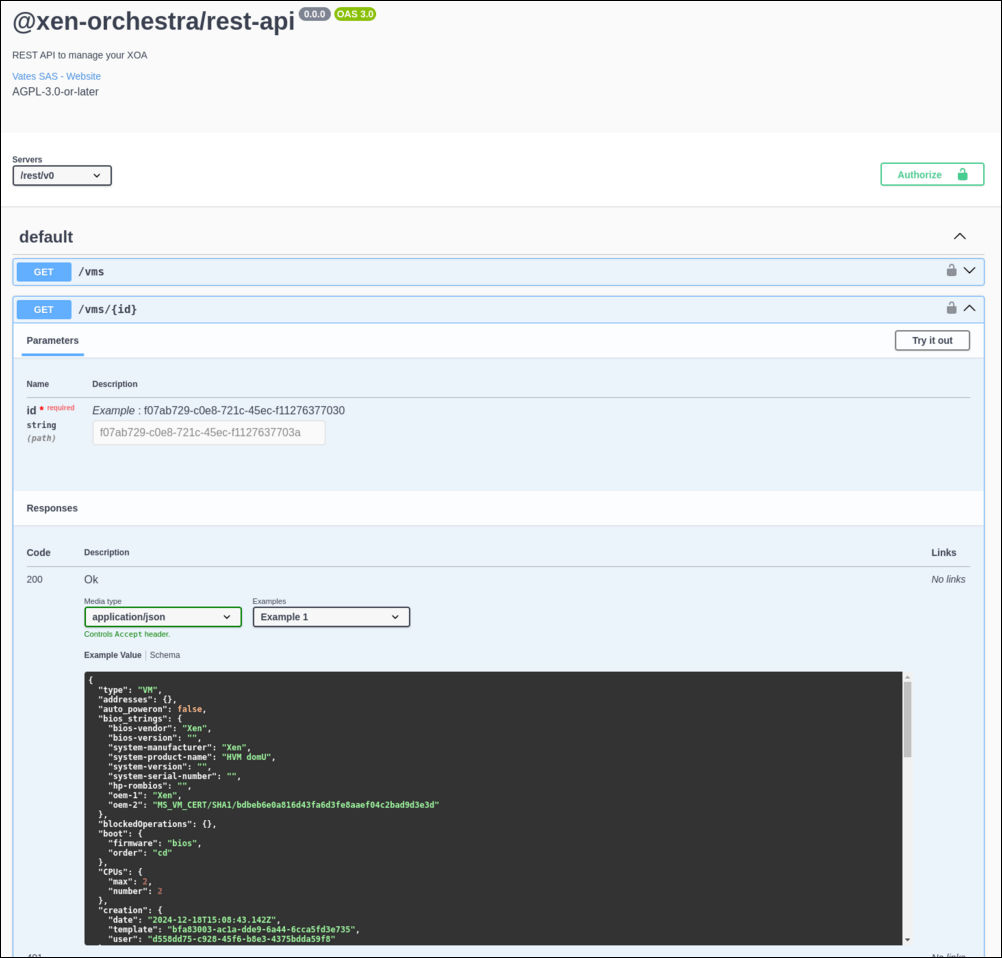
The Swagger UI doesn't just document every route, parameter and schema: the Try it out button lets you run requests directly from your browser, authenticated by your existing Xen Orchestra session, so you can experiment with the API without writing any code. You will find there everything not shown on this page, including the binary streaming endpoints (XVA export/import for VMs, VHD and raw export/import for VDIs) and the backup, pool, host, SR, network and user routes.
The raw OpenAPI specification is available at https://your-xo/rest/v0/docs/swagger.json, ready to feed a client generator for your favorite language.
Missing an endpoint?
Almost all endpoints you may need are already covered by the REST API, and we keep expanding it. If something you need is missing, please tell us: open a request on our feedback portal or start a discussion on the Xen Orchestra forum. Real use cases are what drive the API's roadmap.